Fix it, move it, or get back into it.
Locked out, stuck on a boot loop, deleted the wrong photos, or moving to a new phone — PhoneToolbox handles all of it from your computer.
PhoneToolbox reads these from a connected phone: Photos, Messages, Contacts, Music, Videos, Call history, Apps, Files.
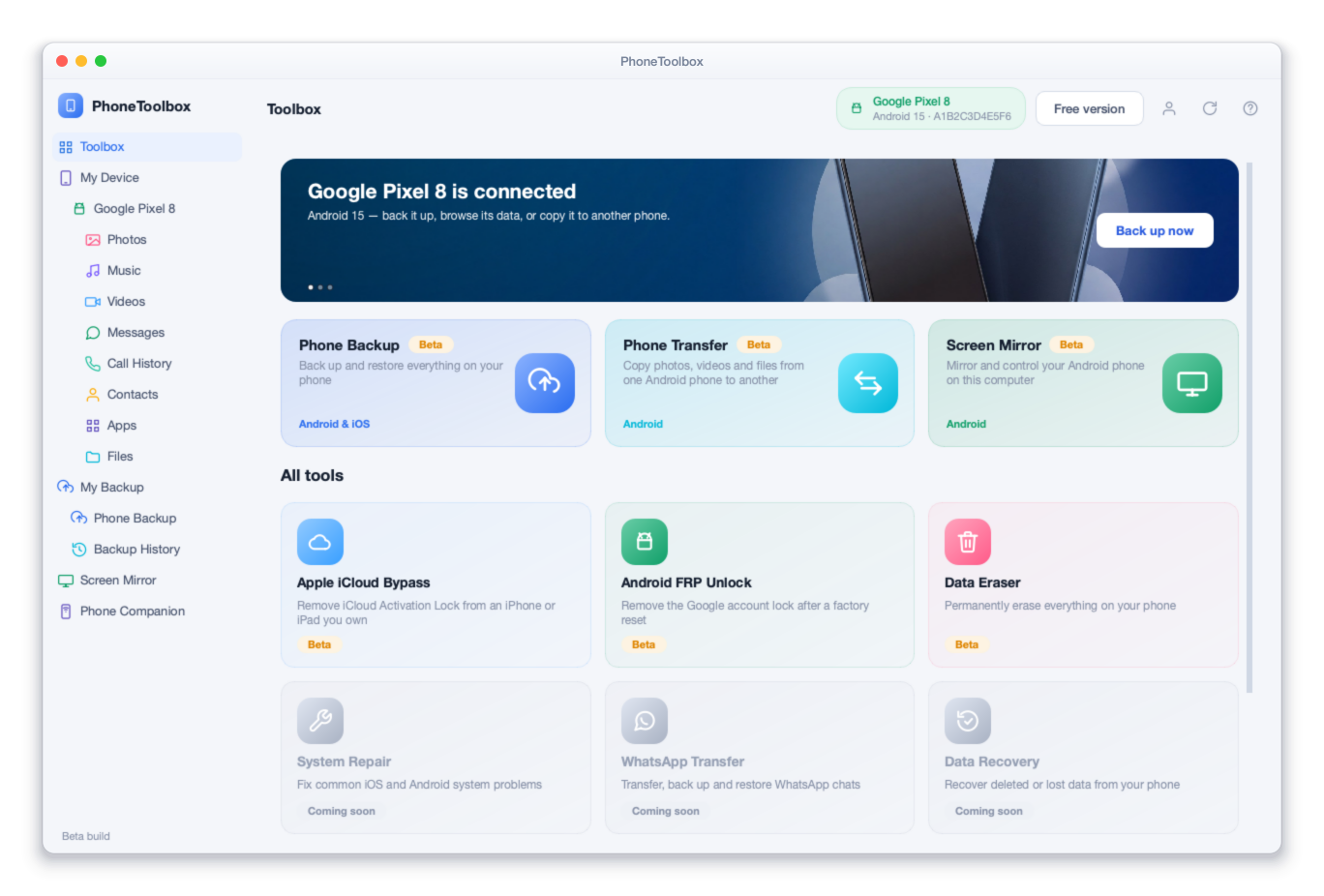
Every tool in the box
Every one of them is in the Full Toolbox — one licence, the lot.
Know before you pay
The scan is free and it is honest. If it cannot help your device, it says so.
Download
Free, no account, no card. Windows or macOS.
Plug in and scan
It identifies your exact model and tells you what it can do.
Decide
Buy a licence in the app only if it can actually help.
Whatever is in your pocket
What is possible differs between iPhone and Android, so we say which is which rather than let you find out after paying.
Looks like you are on — showing that first.
Screen Unlock iOS
Unlock an iPhone or iPad you own.
What it can do on iOSSystem Repair iOS
Repair an iPhone or iPad that will not boot.
What it can do on iOSData Recovery iOS
Recover deleted data from an iPhone or iPad.
What it can do on iOSPhone Manager iOS
Manage an iPhone without fighting iTunes.
What it can do on iOSPhone Backup iOS
Back up an iPhone without iCloud limits.
What it can do on iOSScreen Mirror iOS
iPhone mirroring is not ready yet.
What it can do on iOSPassword Manager iOS
Recover passwords saved on your iPhone or iPad.
What it can do on iOSScreen Unlock Android
Unlock an Android phone you own.
What it can do on AndroidSystem Repair Android
Repair an Android phone that will not boot.
What it can do on AndroidData Recovery Android
Recover deleted data from an Android phone.
What it can do on AndroidPhone Manager Android
Manage an Android phone from the desktop.
What it can do on AndroidPhone Backup Android
Back up an Android phone properly.
What it can do on AndroidScreen Mirror Android
Mirror and control an Android phone from your desktop.
What it can do on AndroidIdentical on both, so they get one page each
For when nothing has gone wrong
The rest of the box is the boring, useful half — managing, backing up and mirroring a phone that is working perfectly well.
Move everything to a new phone in one go.
Copies photos, video, music and files from one Android phone to another, with both connected at once.
- Android to Android — iPhone transfer is not supported yet
- Photos, video, music and files
- One pass, both phones connected at once
- Choose what moves rather than taking everything
Back up your phone to your own computer.
Takes a full or selective backup you keep yourself, and restores single items without wiping the phone.
- Full or selective backup, stored on your own computer
- Restore single items instead of the whole device
- Backups never overwrite each other
- Read and export from a backup without restoring it
Put your phone screen on your computer.
Mirrors an Android phone to a big screen over USB.
- Mirror an Android phone over USB
- Full-screen for presentations and demos
- iPhone mirroring and screen recording are not available yet
Find the passwords already saved on your iPhone.
Reads the accounts and wi-fi passwords stored on your own device and exports them somewhere you can use.
- Saved wi-fi passwords
- App and website logins stored on the device
- Apple ID and Screen Time details
- Export to a password manager
All of these are in the Full Toolbox, $49.99 a year — see what is in it.
What people open it for
Six situations that account for most of the day. Each one goes to the page that says exactly what happens, on your kind of phone.
Forgotten iPhone passcode
Locked out of your own iPhone or iPad after too many wrong attempts.
Google FRP after your own reset
You reset the phone yourself and it is now asking for the account it had before.
Stuck on the Apple logo
Boot loops, recovery-mode loops and updates that never finished.
Deleted the wrong photos
Scan the phone and your backups, and see what is still there before you pay.
Selling it on
Wipe it so it cannot be pulled back — the part a factory reset does not guarantee.
Moving to a new phone
Contacts, messages, photos and music across, in either direction.
Scan and preview for free. Pay only when you want the result.
Free, with no card
- Install and connect your phone — no account, no card
- Full scan and preview of what is recoverable or transferable
- Device diagnostics and a readable status report
- Enter recovery mode and other reversible utilities
Needs a licence
- Exporting or saving recovered files
- Completing an unlock, repair or erase
- Running a transfer to another device or computer
7-day money-back guarantee on every plan. A licence is bought inside the application, not on this website.
Two ways to buy
One licence for you, or a per-phone plan for a workshop. Every tool is in both, on Windows and Mac, and the app is free to download and scan first.
Full Toolbox
5 phones · 2 computers
7 of 14 tools ready today · the rest arrive at no extra cost
Secure card checkout · 7-day money back
Business
1 phone per seat · 5 computers
7 of 14 tools ready today · the rest arrive at no extra cost
$59.98 a year for 2 phones
Minimum 2. Each seat is one handset for the licence year. Need more than 500? Talk to us.
Secure card checkout · 7-day money back
Full Toolbox
5 phones · 2 computers
7 of 14 tools ready today · the rest arrive at no extra cost
Secure card checkout · 7-day money back
Business
1 phone per seat · 5 computers
7 of 14 tools ready today · the rest arrive at no extra cost
$59.98 a year for 2 phones
Minimum 2. Each seat is one handset for the licence year. Need more than 500? Talk to us.
Secure card checkout · 7-day money back
All prices in USD. Download and scan for free first. Buy here, or from inside the app — it opens this same checkout.
Software you run, or a job we do
These are two different products and it is worth a moment to land on the right one.
PhoneToolbox — you run it
Software on your computer, with the phone plugged in. Right for a forgotten screen lock, a phone stuck on the logo, deleted photos, or moving everything to a new handset.
Needs the phone in your hands
Remote unlock — we do it
You send the IMEI and we do the work through official channels. Right for a carrier-locked phone, and the only route for a network unlock that sticks permanently. Nothing to install.
Before you download
No, and they solve different problems. Our unlock service is done remotely from the IMEI number — you send us the number and we do the work, with nothing to install. PhoneToolbox is software you run on your own computer with the phone plugged in. If the phone is carrier-locked, the remote service is what you want. If you are locked out of your own screen or the phone will not boot, this is.
No. The download is free and it scans your phone, identifies it, and tells you exactly what it can do before you spend anything. A licence is only needed to complete the job.
Both. Some tools are Windows-only where the underlying support does not exist on macOS, and each tool page says so rather than leaving you to find out after paying.
It is not built for that. Several tools ask you to confirm the device is yours before they run, and some situations still require proof of purchase. A phone locked to somebody else has to be released by that person.
Inside the application. Download it free, run the scan, and if you want to go ahead the app opens a secure checkout in your browser. There is no way to buy from this website, which is why you will not find a buy button here.
More about PhoneToolbox
Find out if it can fix your phone — free.
Install PhoneToolbox, plug the phone in, and it tells you exactly what it can do before you spend anything.
Free scan · No account · 7-day money back
PhoneToolbox
Free download · scan and see what it can do before you pay · 7-day money back